Showing posts with label Cracking. Show all posts

Monday, July 14, 2014 3:37 AM

How to Crack FTP password from FileZilla??

Wonder How to crack FTP password from FileZilla, when it is an application to connect to FTP server? Well guys this is not a hack. it is simply a Trick so that you can Grab bunch of passwords that were connected to FTP server from FIlezilla.

Beware, FileZilla doesn't protect your password. 
It simply save your password in xml data in your users Roaming directry.

In this tutorial we will go through how to extract saved password in Filezilla so without wasting time lets start step by step tutorial


Step 1:

Go to your desktop, Here im using desktop tab in favorite now go to Users (system folder).


Step 2:

Before going further lets we unhide(show hidden items) everything. So it will help us in future steps
for doing this
goto view on top of your explorer
and make sure you've checked on hidden items

Step 3:

Now you're ready to go further.. if you've done properly in above step 2 you should see AppData Directory. Now go to AppData and open Roaming directory


Step 4:

Now you should see FileZilla folder inside Roaming Directory
Open FileZilla.

Now You should see some xml files (filezilla.xml, filters.xml, queue.xml and other)
Right Click on recentservers.xml left click on "Edit with Notepad+" or simply "Edit" in drop menu

Step 5:

Now voila, You've successfully cracked FTP password :D

Conclusion

Never leave your history.. always clear your history after using FileZilla for protecting your password.. in 2009 many of the servers were hacked by FileZilla malwares. by default FIlezilla doesn't protect your password

hope you've enjoyed tutorials

Sunday, June 22, 2014 5:23 PM

A Beginners Guide to Ethical Hacking - E-BOOK

A Beginners Guide to Ethical Hacking is a complete path for newbie hackers who want are curious to Learn Ethical Hacking Techniques.The Information given in this book will make you a master hacker.

How will the information in the book affect me?

  • You will learn All Ethical hacking techniques and also you will learn to apply them in real world situation
  • You will start to think like hackers
  • Secure your computer from trojans,worms, Adwares etc
  • Amaze your friends with your newly learned tricks
  • You will be able to protect your self from future hack attacks
 Download it for free


Wifi Packet Capturing and Session Hijacking using Wireshark 1


The main Objective of this Attack is to make a Fake Access point and send the fake ARP Packets on same Wi-Fi Network from where the users are connected and the name of fake access point is same as the name of the wireless network reside there. So when a fake access point is created with same wireless network name then the user which is connected to original network gets disconnected and connects with your fake access point, so all the traffic tunnels throughout my system and we get all details/credentials/information of that user which is generally known as session hijacking.


Requirements

1. Backtrack Operating System (BT5)
2. Virtual Machine (With USB Adapter)
3. Internet Access on your System 

Step 1

Open Backtrack Operating System and start Terminal and type “iwconfig” for checking wireless interface.

Description – 
iwconfig is similar to ifconfig, but is dedicated to the wireless interfaces. It is used to set the parameters of the network interface which are specific to the wireless operation (for example: the frequency).

Step - 2

Start this Wireless Interface by typing this command 
“airmon-ng start wlan0”.
 
Description – 
This script can be used to enable monitor mode on wireless interfaces. It may also be used to go back from monitor mode to managed mode. Entering the airmon-ng command without parameters will show the interfaces status. 
wlan0 is your wifi card.  wlan is wireless lan and 0 is the number of your card.

Step - 3

Start your monitor mode by typing this command “airodump-ng mon0”. It captures data from all stations. 

Description -    
Airodump-ng is used for packet capturing of raw 802.11 frames and is particularly suitable for collecting WEP IVs (Initialization Vector) for the intent of using them with aircrack-ng. Also airodump-ng is capable of logging the coordinates of the found access points. 
mon0 is the same card (wlan0) in monitor mode.  Once you put wlan0 in monitor mode it will be read as mon0 and wlan0

Step - 4

Set up the channel ID which is shown above in airodump-ng command by typing these commands   “iwconfig mon0 channel 5”      “iwconfig wlan0 channel 5
                                               OR 
iwconfig wlan0 channel 5”     “iwconfig mon0 channel 5”  

Decription -  
iwconfig is similar to ifconfig, but is dedicated to the wireless interfaces. It is used to set the parameters of the network interface which are specific to the wireless operation (for example: the frequency).
wlan0 is your wifi card.  wlan is wireless lan and 0 is the number of your card. 
mon0 is the same card (wlan0) in monitor mode.  Once you put wlan0 in monitor mode it will be read as mon0 and wlan0. 
The ”–channel” (-c) option allows a single or specific channels to be selected.

Step -5

Now Setup your Fake Router by typing this command 
“airbase-ng - e “belkin.3448” mon0” 
Description – 
Airbase-ng is multi-purpose tool aimed at attacking clients as opposed to the Access Point (AP) itself. The main idea is of the implementation is that it should encourage clients to associate with the fake AP, not prevent them from accessing the real AP.
”– essid” (-e) of the Network.

Step - 6 

Now it’s time to bridge all networks by typing these commands   
“brctl addbr mitm”  
“brctl addif mitm eth0” 
 “brctl addif mitm at0”
Here – mitm is <interface name>
Description - 
Brctl - is used to create a bridge between two interfaces. 
Addbr - A bridge can be added using the following command, with <name> being replaced with the name of the bridge being replaced. 
Addif - To add a interface to a bridge, Where <brname> is the existing bridge name, and ifname is the interface you want to add.

Tuesday, June 10, 2014 12:11 AM

Hack Windows password in notime

So you were looking for Windows 8 password hacking tool. Never found any interesting post; right?

Now here I'm back with 100% working Windows 8 password hacking tutorial

So what are you looking at start downloading tool and proceed step by step

Step 1

Download Tool [click here]
Now Extract downloaded tools where ever you want

Step 2

Open appropriate folder x64 or win32 suitable for your Operating System

Step 3

Run mimikatz as a Administrator
on Firewall notification select "Yes"

Step 4

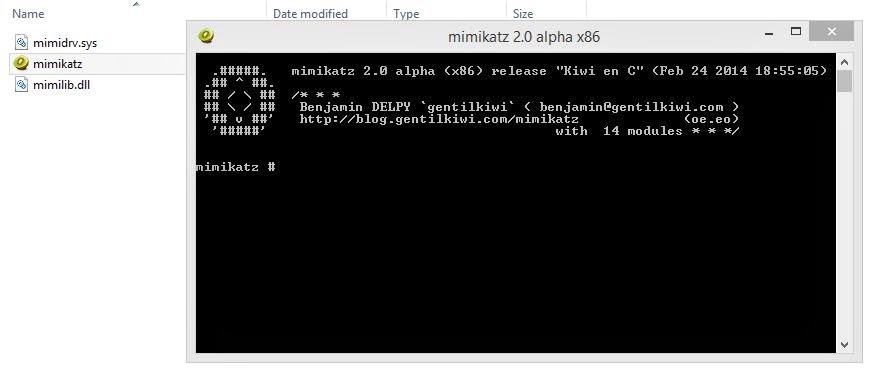
Now this screen will be displayed


Step 5

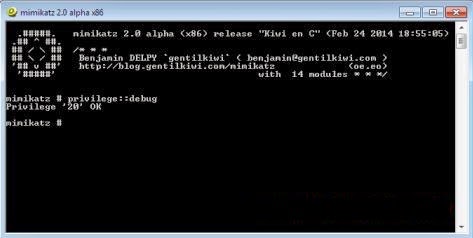
To Check privilege is given or not enter the code below:-
privilege::debug
You should get result like below image

Step 6

If you get privilege as image above now you are ready to get password
now Enter the command below to get the password
 sekurlsa::logonPasswords full
there is space after passwords 
   
 Hope you've enjoyed this tutorial :) please comment your feedback

Recent Post

Total Pageviews

Powered by Blogger.

Popular Posts